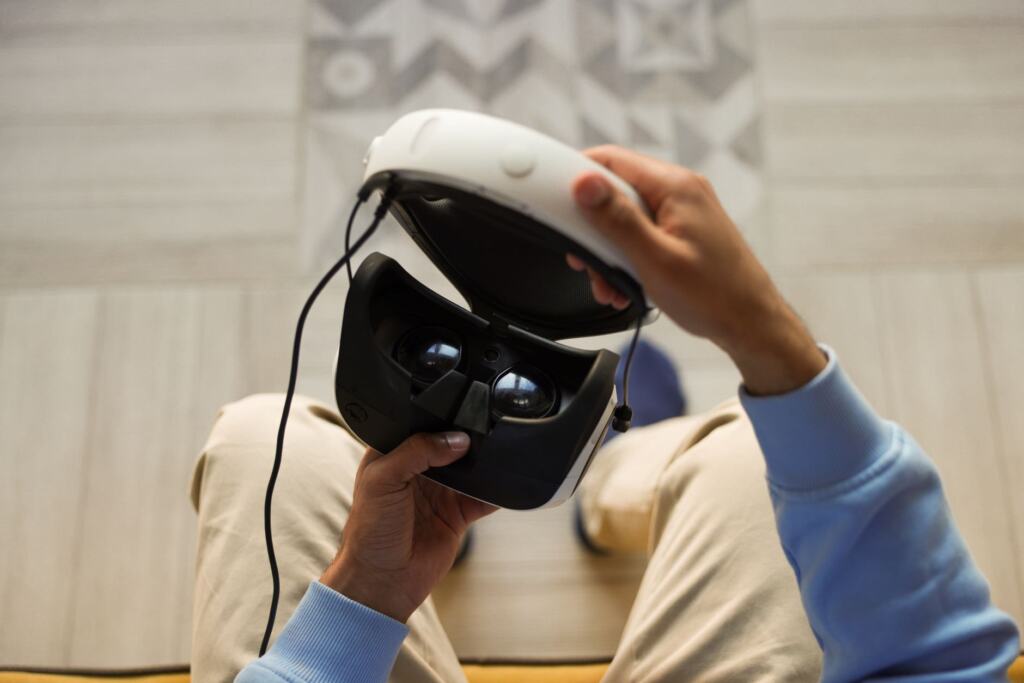
Fingerprints on the lenses before a session call for a dry microfibre cloth, not a spray. That is the core of how to clean VR headset optics safely: light circular strokes from the centre outward, with no liquid near the optics.
The rest of the headset needs different handling. Hard plastic tolerates a diluted alcohol cloth, while the face interface prefers mild detergent and air drying. If you are still choosing hardware, our comparison of the best vr headset uk options is worth reading, because a wipeable face cushion makes upkeep easier.
Lenses: keep them dry and the strokes light
The most common mistake is treating VR lenses like spectacles and reaching for a spray. Axon’s headset cleaning guidance for its VR training headsets (last modified 01 April 2026) says never to apply any cleaning solution to the lenses and to use a dry lint-free cloth. A Quest 2 care guide describes its lenses as very sensitive and prone to scratching, a sensible assumption for any Fresnel lens. It also says not to use water or any other cleaning liquid on them.
The routine
- Choose the cloth. Use a clean, dry microfibre cloth. Cleanbox, a VR sanitising vendor, recommends microfibre because it does not leave residue.
- Wipe in circles. Start at the centre of the lens and move toward the edges in a circular motion, as Axon’s guidance describes.
- Switch to a clean section. Turn the cloth to an unused area before another pass, so you are not moving the same smear around.
- Keep air away. If dust is the problem, do not aim compressed air at the lenses themselves, according to the Quest 2 guide.
When a spot will not lift
A Meta Quest care guide suggests slightly dampening a corner of the microfibre cloth with distilled water for stubborn spots, and warns that alcohol or chemical cleaners can damage the lenses. Axon says never to apply cleaning solution to the lenses, and the Quest guide says no water or cleaning liquid on them. Treat the damp corner as a last resort and use it only if your own headset’s manual permits it. If the manual is silent, stay dry.
Cleaning assumptions that damage headsets
Most cleaning damage comes from a reasonable-sounding habit applied to the wrong part. The table sets the common assumptions against what the manufacturer-style guidance supports.
| Common assumption | What the guidance supports | Planning use |
|---|---|---|
| A little lens spray will lift smears | Never apply cleaning solution to the lenses; use a dry lint-free cloth. Quest 3 guidance also warns against alcohol or chemical cleaners on lenses. | Keep sprays and wipes out of the lens area entirely. |
| Alcohol is fine on every surface | A cloth dampened with a diluted alcohol mixture (75%) is for hard plastic surfaces only. The Quest 3 face interface should avoid chemical cleansers and alcohol. | Match the product to the material before you wipe. |
| Spraying or pouring is quicker than wiping | Do not spray or pour liquid directly onto the headset or controllers. | Apply liquid to the cloth, never to the device. |
| The face interface can be soaked | Hand wash with cool water and mild liquid detergent, but do not submerge it, then air dry completely before reattaching. | Wash briefly and let it dry fully before the next session. |
Figures and cautions here come from Axon’s headset cleaning page and a Quest 3 care guide.
Three further misunderstandings are worth correcting:
- “Compressed air is harmless.” It is useful for dust elsewhere on the headset, but the Quest guide says not to aim it at the lenses.
- “Disinfectant can stay on.” Axon says all disinfectants must be wiped off completely before use, so finish with a cloth pass on hard plastic.
- “One headset’s rules cover them all.” Axon’s page covers its own training headsets and the other guides cover Quest models. Where they agree (dry cloth, no spraying), you can rely on it. Where they differ, your own manual wins.
Alcohol wipes: where they help and where they do not
Isopropyl alcohol wipes suit some surfaces and not others, so the answer to “can I use alcohol wipes?” depends on the material and on your headset’s maker.
Hard plastic exterior
Axon allows a cloth dampened with a diluted alcohol mixture on hard plastic surfaces. Accessory sellers are more cautious. The Quest guide asks for non-abrasive, alcohol-free antibacterial wipes on the headset plastic, and Cleanbox recommends avoiding alcohol, bleach or other antibacterial wipes because they can damage the lenses, sensors and exterior surface. If your manual does not mention alcohol, alcohol-free wipes are the lower-risk choice for the plastic.
Face interface
On a Quest face interface, avoid chemical cleansers and alcohol. A smooth PU leather or similar interface is the exception: the Quest guide says a quick clean with antibacterial wipes should be fine. Fabric and foam interfaces should not get the same treatment, so check the material before you wipe.
Face interface and strap care
The face interface takes the sweat and grease, so it is the part that most often needs a proper wash. The Quest 3 guide describes the method: take the interface off, hand wash it with cool water and mild liquid detergent, rinse, and let it air dry completely before reattaching it. Do not submerge it. Accessory guides for the Quest 2 explain why: repeatedly soaking a fabric interface can make the spongy material inside brittle and deteriorate.
If a wrist strap is removable, the same Quest 3 guide says to hand wash it with cool water and mild soap. Keep that to straps you can detach, and leave fixed straps to a damp-cloth wipe in line with your manual.
Safe materials to keep on hand
- Microfibre cloth: the one material every guide agrees on for lenses, used dry.
- Distilled water: the Quest 3 guide prefers it when a cloth must be dampened, and the damp corner is for stubborn lens spots only.
- Mild liquid detergent or mild soap: for the face interface and removable wrist straps, used in cool water and rinsed.
- Alcohol-free antibacterial wipes: for headset plastic where the maker is silent on alcohol, or a 75% diluted alcohol cloth on hard plastic where the maker allows it.
- Wipeable face cushions: Cleanbox advises these for shared headsets, so cleaning between users is a quick job.
- Avoid: bleach, any solution on the lenses, and liquid sprayed or poured on the headset or controllers.
Related reading
Face-worn tech goes beyond headsets, and Smart Glasses For Blind People: How Wearable Vision Tech Restores Independence In 2026 – Viarama looks at how wearable vision devices are used day to day. For background on how today’s hardware arrived, see Who Invented the VR Headset? The Short History From Sensorama to Oculus (2026) – Viarama.
Frequently asked questions
| Question | Answer |
|---|---|
| How often should I clean the face pad? | Wipe it between uses. Cleanbox suggests a non-toxic baby wipe to remove makeup, grease and hair, though that is not disinfection. Save the full hand wash for when a wipe is not enough, since repeated soaking can make foam brittle. For shared headsets, wipeable cushions are advised. |
| Does a quick wipe disinfect the headset? | No. Cleanbox says the headset must stay wet with the chemical for at least 4-10 minutes for disinfection, so a fast pass only removes surface grime. |
| Should I wipe the tracking cameras? | Avoid them. The Quest 2 guide says to try not to pass the wipe over the four tracking cameras on the outside. |
| Can I dry the headset in sunlight? | It is best not to. Axon’s guidance says not to expose the headset or controllers to UV rays or direct sunlight. |