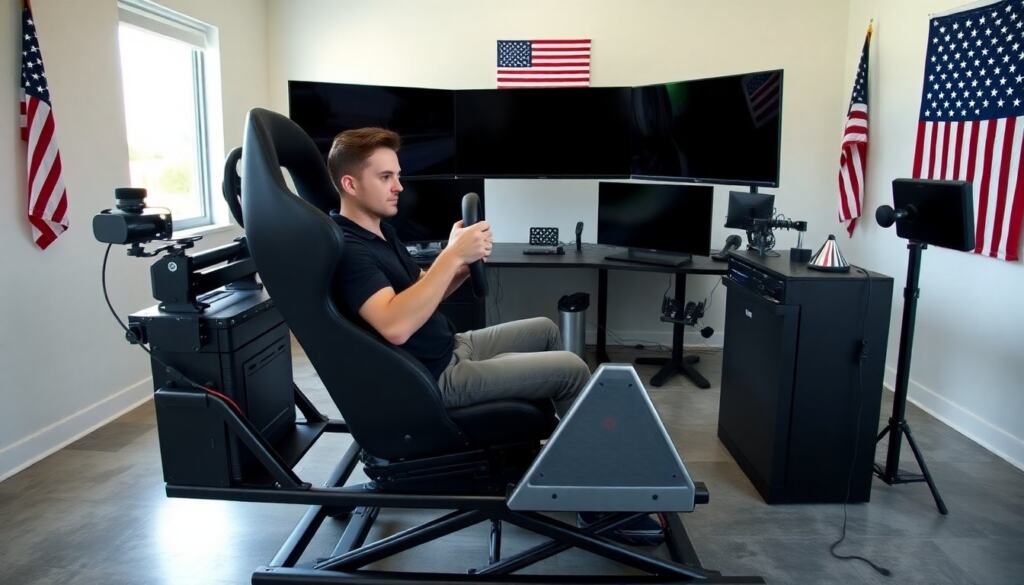
A sim racing cockpit gives a player a stable frame, a proper seat, and direct input for wheel and pedals. The sim racing cockpit boosts immersion and improves lap times by locking hardware into a repeatable, adjustable geometry that mimics real car seating and control layout. Buyers choose a cockpit for realism, driver training, consistent practice, or broadcast-ready aesthetics. This guide explains who benefits, key parts and trade-offs, how to match a cockpit to your space and budget, how to set up the rig ergonomically for repeatable performance, and which upgrades deliver the biggest improvement in feel and lap time through 2026.
Key Takeaways
- A sim racing cockpit enhances realism and lap times by providing a stable frame and ergonomic positioning for wheel and pedals; rigidity and consistent geometry are more important than cosmetic extras.
- Choosing the right sim racing cockpit depends on space, budget, and goals, with options ranging from compact rigs and wheel stands to full-frame and motion-ready platforms; each form factor has trade-offs in stability, expandability, and portability.
- Prioritize your budget: a strong wheelbase (or reliable belt/direct-drive unit) and a load-cell or well-tuned brake pedal give the largest measurable gains in control; frame and seat choices matter for comfort and durability but are secondary to primary controls.
- Proper ergonomic setup includes aligning the wheel at eye level, maintaining a comfortable seat-to-pedal distance, ensuring neutral wrist and ankle positions, and eliminating rig flex for consistent inputs.
- Upgrading your sim racing cockpit gradually—starting with the wheelbase and brakes—can boost feel and immersion; later investments in pedals, a proper seat, and motion or haptics are higher-cost but rewarding for serious sim racers.
- Space-conscious buyers can opt for foldable, compact, or wheel-stand solutions; teams, schools, and commercial operators should choose heavy-duty, serviceable rigs with replaceable wear parts and easy cable management.
What Is A Sim Racing Cockpit And Who Should Buy One?
A sim racing cockpit is a dedicated rig that holds the steering wheel (and wheelbase), pedals, seat, and often a shifter and handbrake in a fixed, adjustable geometry. More than a chair with a wheel, a cockpit creates a single structural system so inputs from hands and feet transfer cleanly to the simulation hardware. Who should buy one?
- Casual gamers who want a notable step up from controller or desk-mounted setups — a basic cockpit or wheel stand offers better feel and immersion without a large investment.
- Aspiring track drivers and serious sim racers who need repeatable ergonomics for training — a rigid frame and quality pedals/wheelbase are essential for transferable practice.
- Streamers and content creators who want a professional on-camera look and reliable, easy-to-reposition hardware.
- Families or multi-user environments who need adjustability and durability — look for quick-adjust seats, multiple user presets, and protective finishes.
- Organizations (racing schools, esports teams) that require commercial-grade rigs built for continuous use, serviceability, and safety.
Consider also life factors: limited space, apartment rules, or shared homes may push buyers toward foldable or compact cockpits and wheel stands rather than permanent, full-size rigs.
Key Components And Common Form Factors
A sim racing cockpit combines several subsystems that each influence feel, cost, and future upgrades:
- Wheelbase and wheel rim: the motor unit and rim determine force feedback fidelity and the local steering feel; direct-drive units give the strongest, most detailed feedback, while belt and gear systems are cost-effective and quieter.
- Pedals: simple potentiometer units are fine for novices; load-cell brakes and progressive brake platforms offer better modulation and lap-time benefits for serious users.
- Seat or cockpit chair: fixed buckets, racing seats, and office-style seats offer different comfort and mounting options. Seat position relative to the controls defines the driving posture and influences fatigue over long sessions.
- Frame and wheel deck: steel and aluminum frames trade weight, stiffness, and portability. A solid pedal plate and wheel mount reduce flex and improve input consistency.
- Accessories: shifters, handbrakes, button boxes, monitor stands, triple-screen mounts, and VR keep immersion and ergonomics in check.
Common form factors:
- Wheel stands and foldable rigs: compact and inexpensive, good for tight spaces and casual use; limited in expandability and long-term stiffness.
- Compact cockpits: smaller footprint than full frames, often with adjustable geometry, ideal for apartment users who want better stiffness than a wheel stand.
- Full-frame rigs: larger, heavier frames built for stability and upgrades, suitable for high-performance direct-drive systems and motion platforms.
- Motion-ready and motion platforms: external platforms or integrated motion bases add seat movement (pitch/roll) to simulate acceleration forces — strong immersion gains but higher cost and increased complexity.
- Modular rigs: designed to accept different wheel mounts, pedal plates, and seats so users can upgrade components over time without replacing the whole frame.
How To Choose The Right Cockpit For Your Space, Budget, And Goals
Start with a short checklist: measure your available floor area and doorways; decide whether the rig needs to fold or be easily moved; set a total budget that covers wheelbase, pedals, and frame together. Then balance trade-offs:
- Space: if you have under 1.5 m of depth, a compact cockpit or wheel stand is often the only realistic option; if space allows, a full-frame rig with a dedicated monitor or triple-screen stand improves immersion.
- Budget tiers: entry-level rigs are focused on value (wheel stands, belt-drive wheels, single-axis pedals). Mid-range buys typically offer direct-drive entry units or higher-quality belt units plus load-cell brakes. Prosumer builds add premium direct-drive bases, pro pedalsets, and motion or professional seats.
- Goals: prioritize components that align with your goals — e.g., lap-time improvement (wheelbase + pedals), streaming/aesthetics (seat, shifter, clean cabling), or immersive training (motion, force feedback fidelity).
- Compatibility and upgrades: confirm wheel and pedal mounting patterns, controller compatibility, and whether the frame accepts third-party seats or motion bases. Picking a motion-ready frame now avoids mounting problems later.
Common mistakes to avoid: buying an expensive wheelbase and mounting it to a flimsy stand (creates flex and wasted performance), ignoring pedal ergonomics (poor pedal spacing ruins long sessions), or choosing a non-modular frame that prevents later upgrades.
Setup And Ergonomics: Positioning, Adjustment, And Comfort Tips
Ergonomics are critical for comfort and consistent performance. Follow pragmatic setup steps:
- Seat position: set the seat so your knees are slightly bent at rest and you can fully depress the pedals without locking your knee. Adjust backrest angle to support your lower back while allowing a natural steering posture.
- Wheel height and distance: position the wheel so its center is approximately at eye level and your elbows form about a 90–100° angle at full lock; this reduces shoulder strain and gives predictable steering inputs.
- Pedal placement and angle: mount pedals so your heel can pivot on the floor or a heel plate; a slight toe-up angle improves heel-and-toe control and reduces ankle fatigue. Ensure brake travel and pedal stiffness match your hardware and driving style.
- Minimize flex: tighten all fasteners, replace soft bolts or plastic braces with stiffer alternatives if needed, and use a rigid pedal plate for consistent force transmission from leg to sensor.
- Cable management: route cables away from moving parts, use cable clips or sleeves to keep the cockpit tidy, and secure power supplies to avoid disconnections during motion or heavy inputs.
- Comfort and health: use breathable seat material for long sessions, consider vibration-damping pads between frame and floor to reduce transmitted noise, and take regular short breaks every 45–60 minutes to maintain focus and reduce strain.
Small adjustments produce big gains: micro-adjust seat fore/aft for smoother braking transitions; adjust steering lock and rotation range to match the car class you practice; and save geometry notes or photos for repeatable setup after moving the rig.
Budget Builds To Prosumer Recommendations And Best Upgrades
Design a build path based on how serious you are and how much you plan to upgrade over time:
- Budget starter: wheel stand or basic compact cockpit + belt/gear wheelbase + three-pedal set with potentiometer sensors. Pros: low cost, small footprint. Cons: limited feedback fidelity and long-term upgrade paths.
- Mid-range performance: full-frame or stiff compact cockpit + higher-torque belt or entry direct-drive base + load-cell brake + aftermarket pedal plate and decent seat. This setup balances cost with tangible improvements in lap times and driver feel.
- Prosumer/enthusiast: heavy-duty full-frame, high-end direct-drive wheelbase, pro-grade pedal set (load-cell, adjustable geometry), racing bucket or FIA-style seat, and optionally a motion platform or haptic transducers for immersive feedback.
Best upgrade priority (general recommendation):
- Wheelbase: more torque and better feedback detail yield immediate control improvements.
- Brake system: load-cell or well-tuned hydraulic-style brake improves braking consistency and lap times.
- Pedals and pedal plate: adjustable spacing and stronger sensors improve comfort and precision.
- Seat and mounting: a comfortable, supportive seat reduces fatigue during long stints and enables correct posture.
- Frame improvements: a stiffer wheel deck, reinforced pedal plate, and anti-flex bracing reduce unwanted movement.
- Immersion: replace the wheel rim with a car-specific rim, upgrade displays or VR, and add audio/haptic accessories.
Maintenance and longevity tips: periodically check and retorque fasteners, inspect pedal sensors for wear, keep firmware for wheelbases updated, and clean the seat and wheel according to manufacturer recommendations. For shared or commercial use, maintain a small spares kit (bolts, cable ties, replacement pedal pads) and document common user adjustments to shorten setup time between drivers.