A 360 video booth captures a subject on a rotating platform and records short, shareable clips. Event teams use the 360 video booth to create social-ready content quickly. Marketers use the 360 video booth to increase engagement and collect leads. This guide explains how the 360 video booth works, where it fits, what gear it needs, how to price it, and how to run it well.
Key Takeaways
- A 360 video booth captures shareable, social-ready clips by recording a subject on a rotating platform, ideal for events and marketing campaigns.
- The booth setup requires a high-frame-rate camera, smooth turntable, and even lighting to ensure high-quality footage.
- Event operators should prepare essential gear, confirm site access, and provide branded overlays with quick delivery options like SMS or email.
- Pricing models vary from hourly to flat event rates, with add-ons like instant printing to boost revenue and measurable ROI via engagement metrics.
- Best practices include managing guest flow efficiently, offering immediate clip previews, and assigning dedicated staff for capture and guest experience.
- Using a 360 video booth enhances brand engagement, generates user content, and collects valuable leads across diverse event types.
What Is A 360 Video Booth And How It Works
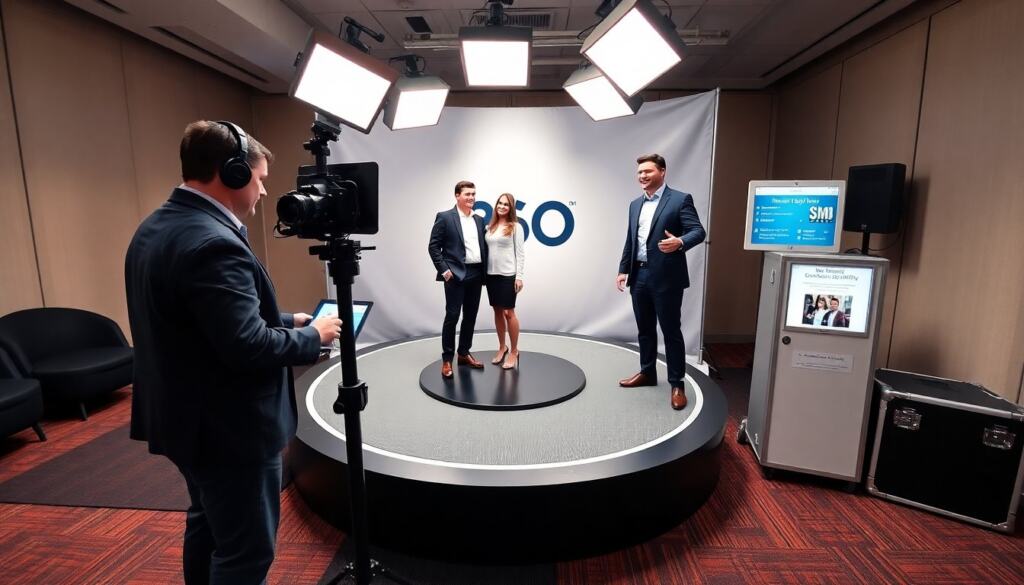
A 360 video booth records a subject from many angles while the subject or camera moves. The booth usually uses a camera rig or a single camera on a boom and a motorized turntable for the subject. The system triggers a brief recording, often 5–12 seconds, while lights and effects run. Software stitches or formats the clip for social use. Operators set frame rate, shutter, and record length. They then deliver a vertical or square clip suitable for Reels, TikTok, and Stories. Brands use the clips as proof of experience and as social currency.
Beyond the basic mechanics, modern 360 setups often include instant processing that adds branded overlays, slow‑motion segments, or music beds. Some systems output multiple formats simultaneously (vertical for stories, square for feeds) to reduce post-event work. The operator’s role includes preconfiguring templates and ensuring consistent look and feel across clips so every participant leaves with on-brand content.
Common workflows start with on-site calibration: confirming turntable RPM, syncing lights to camera settings, and running a few test captures with people of different heights and clothing types. Typical challenges include motion blur at low frame rates, flicker from mismatched lighting vs. camera shutter, and reflections on glossy surfaces; these are addressed through frame-rate adjustments, power-frequency matching, and diffusion respectively.
Key Use Cases: Events, Marketing, And Brand Experiences
Event planners hire a 360 video booth for weddings, product launches, and conferences. Marketers use the 360 video booth to produce user-generated content and paid social ads. Retailers place a 360 video booth in malls for in-person promotions. Talent teams use a 360 video booth to create showreels and influencer content. Agencies use a 360 video booth at activations to gather emails, phone numbers, and opt-ins. Hospitality venues add a 360 video booth to raise guest satisfaction and increase check-ins. Each use case prioritizes quick turnaround and social-ready file formats.
Specific activations illustrate how the booth adds value: at product launches it highlights features with motion and branded animations; at music events it can capture fans with lighting effects synced to the stage; at retail activations it creates a photo-moment that doubles as a lead capture opportunity. For influencer partnerships, the booth becomes a controlled environment to produce multiple polished clips in a short time.
When planning a campaign, align the 360 video booth’s output to the channel strategy: short, high-impact clips for paid placements; slightly longer, narrative variants for organic feeds; and raw files for paid creative edits. Consider privacy and consent — include clear opt-in prompts for email/SMS delivery and for using clips in future marketing.
Essential Equipment And Setup Checklist
An operator must plan gear, space, and power before they arrive. The checklist must cover camera, turntable, lighting, cables, backup batteries, sound-free triggers, and a laptop for capture and delivery. The operator must confirm site access, loading path, and any permit needs. They must test the exact file format clients want. They must supply branded overlays and a delivery option like SMS, email, or an app. They must pack spares for the most failure-prone parts: cables, mounts, and power adapters.
Expand the checklist with practical items and actions: gaffer tape and cable covers for safe foot traffic, a portable canopy or backdrop stand if the venue lacks a clean background, a multi-outlet power strip with surge protection, and a small tool kit (Allen keys, screwdrivers, cable ties). Include a test plan — arrive early to run sample captures with staff acting as participants, verify color and exposure settings, and confirm delivery paths (phone numbers and email addresses) are working.
Logistics to confirm ahead of the event: exact footprint and sightlines (ensure the turntable is visible from camera angles), available ceiling height for boom arms, noise restrictions that affect audio-optional capture, and nearby power circuits to avoid voltage drop. For multi-day activations, schedule nightly backups of all captured content and a quick hardware check list to swap any consumables.
Camera, Turntable, And Lighting Specs To Prioritize
Choose a camera that records high frame rate and clean low-light images. Many operators choose an action camera or mirrorless body set to 60–120 fps. The turntable must spin smoothly at a consistent RPM and support the subject weight. The lighting must provide even, flattering light on the subject. Use a three-point approach when space allows: key, fill, and rim. Use diffusers to avoid harsh highlights. The operator must set white balance and color profile once for the event. They must lock settings to avoid flicker across clips.
Camera selection considerations: sensor size for depth of field control, codec and bitrate for post-processing flexibility, and connectivity options for live preview and tethered control. For turntables, prioritize torque and damping — jerky starts or stops spoil the motion. Rubberized or textured platforms help guests remain steady during rotation. Lighting choices should aim for consistent color temperature; LED panels with adjustable temperature and dimming are common because they are low-heat and portable.
Accessories that improve output: polarizing filters to reduce reflections on glasses, wireless triggers to reduce cable clutter, and an external monitor or tablet for instant review. Plan shutter and aperture to balance motion clarity and subject isolation — higher shutter speeds reduce motion blur but require stronger lighting. Test for skin tones across different lighting setups to ensure the brand’s look remains consistent.
Pricing, Revenue Models, And Measuring ROI
Providers price a 360 video booth by the hour, by the event, or by production tier. An hourly rate covers staff, travel, and on-site time. A flat event price bundles setup, operation, and digital delivery. Add-ons like branded overlays, props, and instant printing increase revenue. Agencies sell a 360 video booth as part of an activation package that includes boosted social posts. Track ROI by measuring shares, impressions, and new leads tied to the 360 video booth. Compare ad cost per acquisition before and after using the 360 video booth to justify spend.
When packaging services, create clear tiers: basic capture with standard delivery, premium with branded templating and rapid turnaround, and enterprise with additional rights, licensing, or bespoke post-production. Offer à la carte upsells such as SMS gateway delivery, onsite prints, green-screen compositing, or multiple camera angles for a cinematic version. Consider minimums for travel and setup to ensure profitability on small gigs.
To measure impact, define KPIs before the event: clip views, social shares, hashtag use, email or phone opt-ins collected, and click-throughs from delivered messages. Use UTM parameters or unique landing pages linked from delivered clips to trace conversions. Run short post-event attribution windows and compare engagement and conversion metrics to baseline campaigns; qualitative feedback from brand teams and attendees also informs long-term value.
Best Practices For Capture, Guest Experience, And Staffing
Set a short queue target to keep guests engaged. An operator should limit sessions to one clip per guest group unless the client pays extra. Staff must greet guests, explain the pose, and cue the recording clearly. Use a preview screen so guests see the result immediately. Offer a branded delivery option via SMS or email to collect contacts. Assign one technician to run the camera and one host to manage the queue and guest experience. Test the entire flow in a dry run before the event and leave time for a mid-event check and small adjustments.
Design the guest experience deliberately: signage with simple instructions, suggested poses or props, and a visible countdown so guests feel confident. Train hosts to upsell add-ons (extra clips, prints, faster delivery) and to handle common questions about sharing and privacy. Use a two-person staffing model at minimum — one to operate equipment and troubleshoot, the other to manage flow, consent, and delivery details — and scale up for high-traffic activations.
Operational best practices include a pre-shift checklist for staff, a contingency plan for equipment faults (spare camera, spare battery, replacement cables), and a simple incident log for any problems encountered. For long events, schedule short staff rotations to keep hosts energetic and consistent. After the event, run a quick post-mortem with the client to capture learnings: what worked, what slowed the line, and suggestions for improving branding, delivery, or technical setup next time.