Pepper’s ghost hologram is a projection technique that creates a floating image from reflection. The technique uses a hidden object, a bright display, and a clear angled surface. It produces a ghostlike, translucent image that viewers see from a single viewpoint. The method dates to the 19th century. The article explains how it works and how to build a simple unit in 2026.
Key Takeaways
- Pepper’s ghost hologram is a 19th-century projection technique that creates ghostlike floating images using reflection on a clear angled surface.
- The technique relies on an angled glass or acrylic sheet reflecting a bright, high-contrast source positioned out of direct view to produce a virtual image.
- Pepper’s ghost hologram remains popular in museums, theaters, retail, education, and events due to its low cost and impressive visual effect without complex hardware.
- Building a DIY Pepper’s ghost setup involves positioning an acrylic sheet at 45 degrees above a monitor playing high-contrast video against a dark background, while masking edges for optimal illusion.
- Common issues include faint images, double reflections, and visible sources, which can be fixed by adjusting brightness, masking, and repositioning the source respectively.
- Creative uses extend from desktop displays and museum kiosks to concerts and interactive booths, with enhancements like syncing panels and adding audio for realism.
What Is Pepper’s Ghost? Origin, Visual Effect, And Modern Uses
Pepper’s ghost hologram refers to an effect that uses reflection to show a virtual image. John Henry Pepper and Henry Dircks popularized the setup in 1862. They built a stage illusion that made actors appear and disappear. The setup used angled glass and hidden lighting. The effect produces a ghostlike image that appears spatially separate from its source. Museums use the effect to show historical figures. Theaters use it for stage illusions and concerts. Retail displays use it to present products as floating visuals. Event producers use it to add spectacle without full hologram hardware. Educators use it to show layered diagrams and demonstrations. The effect scales from small desktop rigs to large projection chambers. The image stays two-dimensional. The image appears three-dimensional when viewers move and the display blends with background cues. The technique works with videos, live camera feeds, or physical miniatures. Modern content creators pair the effect with 4K screens and high-frame-rate video. The technique keeps costs low compared to volumetric displays. The result fits venues that cannot support complex stage mechanics.
How Pepper’s Ghost Works: Optics, Materials, And Practical Setup Tips
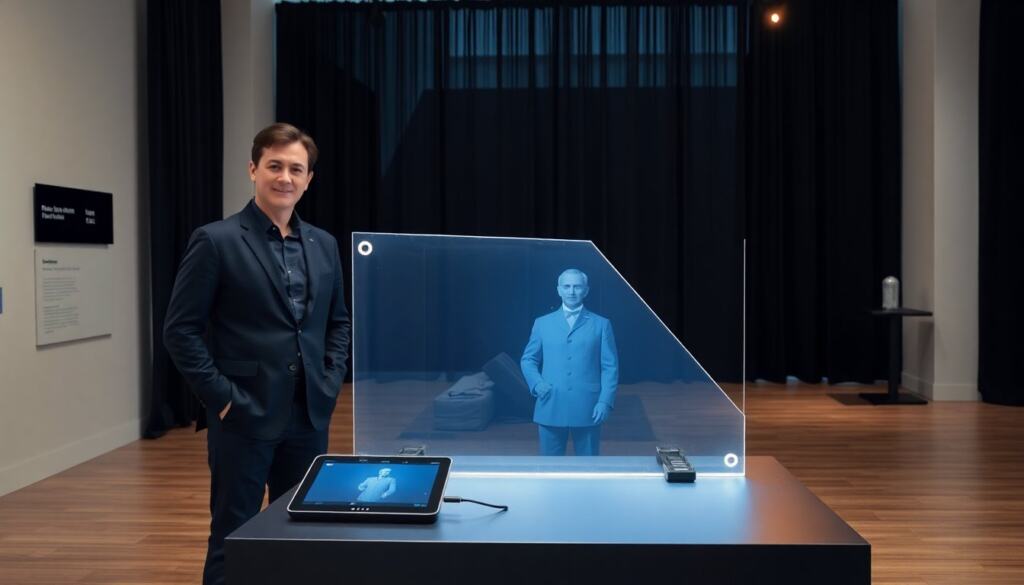
A pepper’s ghost hologram works by reflecting a bright source from a hidden area into a clear surface. Light leaves the source. Light strikes the angled clear surface. Light reflects into the viewer’s line of sight and forms a virtual image. The virtual image appears behind the glass. The glass or acrylic must remain clean and flat. The reflective surface must sit at roughly 45 degrees in many builds. The source must sit below or to the side of the surface so the viewer cannot see it directly. The source needs high contrast and steady brightness. The source benefits from dark surroundings so the reflection stands out. Materials include glass, acrylic (Plexiglas), or PET film. Acrylic is lighter and safer for DIY rigs. The clear surface needs anti-reflective film only if stray reflections cause ghosting. Use black drapes to hide the source and frame the scene. Use a small monitor, tablet, or projector as the source. A brighter projector works for larger installations. Position the viewer along the axis where the reflected image aligns with the background. Test angles and distances with small sketches first. Use clamps to fix the surface angle once alignment works. Avoid visible edges by masking with black foam. For outdoor use, protect electronics and control ambient light levels. For live-camera feeds, balance exposure so the reflected image does not wash out. For video content, use high-contrast footage on a black background. For safety, secure glass or use laminated acrylic to prevent breakage.
Step‑By‑Step DIY Build, Common Problems, And Creative Applications
Step 1: Gather materials. They need a thin acrylic sheet, a small monitor or tablet, black foam board, clamps, and dim lights. Step 2: Cut the acrylic to a trapezoid for a desktop pyramid or to a single angled panel for a stage wedge. Step 3: Place the monitor flat and face-up. Step 4: Set the acrylic at 45 degrees above the monitor. Step 5: Mask edges with black foam so the viewer sees only the reflection. Step 6: Play a high-contrast video with a black background. Step 7: Adjust angle and distance until the image floats at the desired height. Common problem: faint image. They fix it by increasing screen brightness or darkening the room. Common problem: double reflections. They fix it by checking for extra reflective surfaces and by using matte black masking. Common problem: visible source. They fix it by hiding the source behind a black panel or moving the source out of the sightline. Creative application: desktop displays that show a dancer or a product mockup. Creative application: museum kiosks that present an actor reading first-person accounts. Creative application: staged concert moments where a performer appears as a ghostly partner. Creative application: retail window displays that show a rotating product without a physical model. Creative application: classroom demos that layer anatomical parts as floating slices. Creative application: interactive booths that use motion sensors to switch videos when a visitor approaches. They can combine a pepper’s ghost hologram with audio to increase realism. They can sync multiple panels to create segmented depth cues. For advanced builds, they can use OLED panels for deeper blacks and brighter contrast. For safety, they can use shatterproof acrylic and secure the rig to a stable base. For polish, they can add tinted filters to tune color and add a thin haze to increase perceived volume.